Campaign Management for Creators, Agencies and Marketing Teams
Campaign link management is the practice of grouping the short links for one campaign into a single hub, organizing them by channel, and reporting on which channel and CTA earned the clicks.
When one launch runs across several channels, campaign management keeps the readable links together. Group a link per channel into a campaign hub, share them wherever you post, then read which channel and CTA actually won. Built for people running campaigns, not just shortening one-off links.
A flat list of short links, fine for one-off links, hard to read once a launch spans several channels
A campaign hub, every link for one campaign grouped in one place, with channel-by-channel reporting
How campaign management works
Three steps: group readable links, share by channel, report on what won
1. Start with readable links
Create short links with names that read at a glance, like summer-drop-youtube or client-launch-qr. Readable slugs keep a campaign scannable instead of a wall of random characters.
2. Group them into a campaign hub
Put every link for one launch into a single campaign, with one link per channel: YouTube, email, a dynamic QR code, social. Everything for that campaign lives together instead of scattered across a flat list.
3. Share across channels
Post each channel link where it belongs. Because every link sits under the same campaign, you never lose track of which link went to which channel.
4. Report on which channel won
See clicks per link side by side inside the campaign, with AI insights that read the numbers for you. Tell a clear story about which channel and CTA pulled the launch.
Watch the structure get built
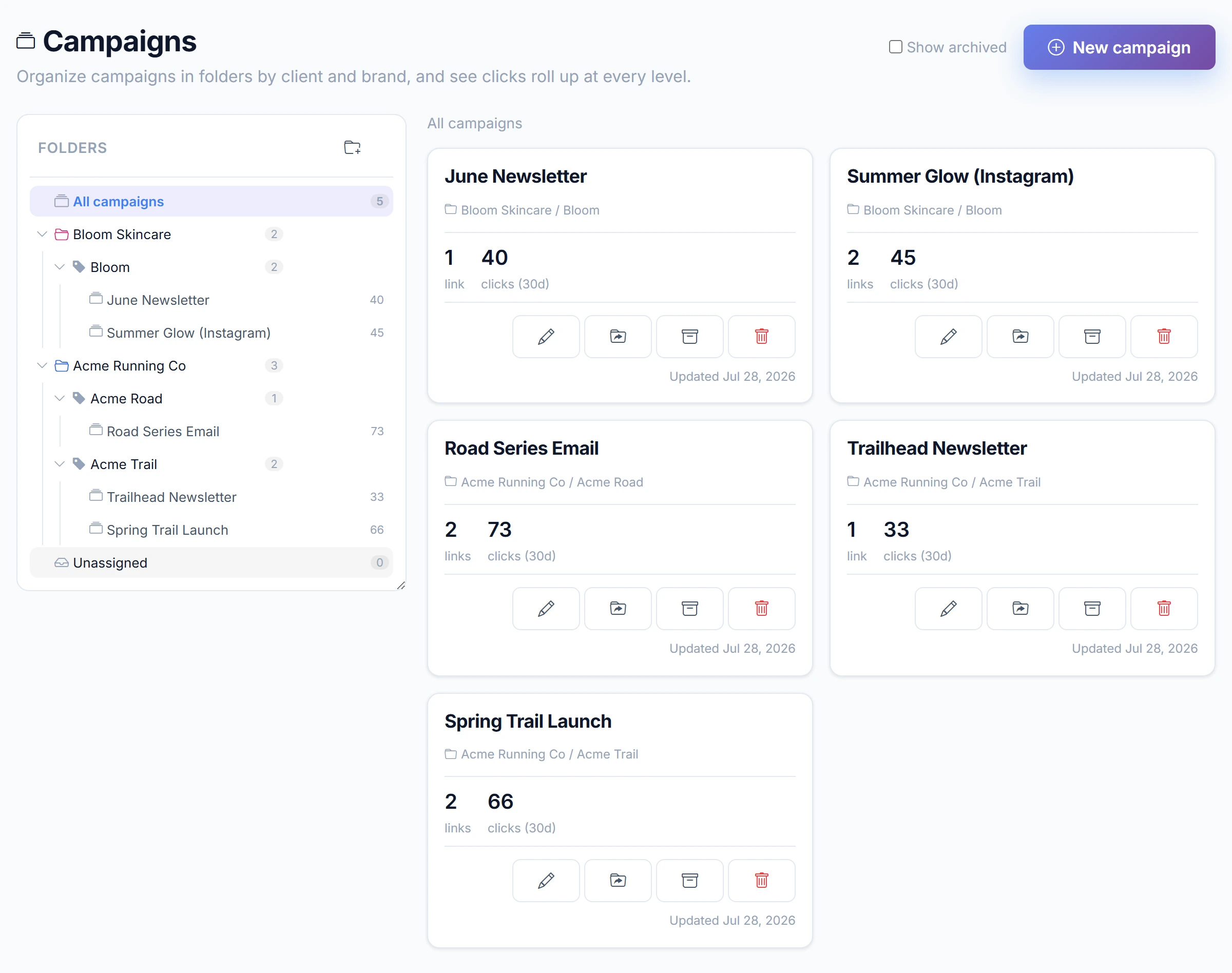
The walkthrough below sets up a client, a brand under it and a campaign inside that, then reads the roll-up at every level without opening a single campaign.
Who campaign management is for
Pick the workflow that matches how you run campaigns
For creators
Posting the same drop across YouTube, Instagram, TikTok, and email? Group the links and see which platform drove it.
For newsletters
Group the links in one issue and compare which CTA actually moved your readers.
For events
One hub per event. Track which channel, from QR to email, drove the signups.
For agencies
One hub per campaign, filed under the client and brand it belongs to, so clicks roll up from campaign to brand to client when several run at once.
Pricing for campaign work
Start free with one hub, move to Pro when more campaigns run at once
Free
Free forever, no credit card
- 2 campaign hubs
- Up to 3 campaign links
- Group links by channel
- Readable campaign slugs
- Clicks per link
- Permanent links (never expire)
Pro
For more serious, multi-campaign work
- Unlimited campaign hubs
- Unlimited campaign links per hub
- Group links by channel
- Readable campaign slugs
- Clicks per link
- Permanent links (never expire)
- Advanced per-campaign analytics
- Channel and CTA comparison
- AI campaign insights
- Export analytics to CSV
- Unlimited data retention
See the pricing page for full plan limits.
View full pricing detailsCampaign management FAQ
What campaign management is, and when to use it
What is campaign management here?
It is a lightweight way to group the readable links for one launch into a single campaign hub, organize them by channel, and report on which channel and CTA earned the clicks. It is about organizing and measuring a campaign, not just creating one short link.
How is this different from just shortening a link?
Shortening turns one long URL into one readable short link. Campaign management groups several of those links, one per channel, under one campaign so you can compare them side by side. Start with link creation, come here when a launch spans more than one channel.
Who is campaign management for?
Creators posting the same drop across platforms, newsletters comparing CTAs, event teams tracking signups by channel, and small agencies running several client campaigns at once. Each has its own guide linked above.
Do I need a paid plan to try it?
No. The Free tier includes two campaign hubs with up to three campaign links each, so you can group a launch and read clicks per link. Pro adds more hubs, more links per hub, and deeper analytics for running several campaigns at once.
What does campaign reporting show?
Campaign reporting is the per-campaign view of clicks for every link in a hub, shown side by side so you can read which channel and CTA earned the clicks. On Pro it adds advanced per-campaign analytics, channel and CTA comparison, and AI insights that summarize the numbers.
How do I organize campaign links?
Create one readable short link per channel, like a YouTube link, an email link, and a QR code link, then group them under a single campaign hub. Each campaign keeps its own links together, so a launch that spans several channels stays organized instead of scattered across a flat list.
How is campaign management different from a campaign tracker or UTM links?
A campaign tracker and UTM parameters tag traffic so analytics can attribute it after the click. Campaign management works at the link layer: it groups the short links for one campaign into a hub, organizes them by channel, and reports clicks per link. You can still add UTM parameters to each link, and the campaign hub keeps them grouped and readable.
Is campaign management a finished feature?
Yes, campaign management is available today. The core idea, one hub per campaign with links grouped by channel and reporting, is in place, and we keep refining it. Check the pricing page for current plan limits.
Related resources
Compare the workflow and start with link creation basics
Device & Geo Targeting
Put one link in a campaign and let device and country route each visitor to the right destination.
Bitly Campaigns alternative
How lightweight campaign hubs compare with the Bitly Campaigns workflow.
Link expiration
Close a campaign's links when the campaign ends, on a 7, 14, 30, or 90 day window.
All features
The full set of link tools that campaign management is built on.
URLcut link analytics
Campaigns are measured by per-link and per-campaign click analytics.
URL shortener for agencies
Run campaigns for many clients with your whole team on the Agency plan, roles and multi-client folders included.
Pricing
Free tier with one hub, Pro for running more campaigns at once.
Group your next launch into a campaign
Keep the readable links together, share them by channel, and read which channel won.
Start free with two campaign hubs, no credit card required.