URL Shortener for Marketing Agencies
Create branded, human-readable short links your clients can recognize. URLcut helps agencies turn long client URLs into clean, custom links with AI-powered slugs, then organize every campaign by client and brand so clicks roll up from a single campaign to a whole brand to everything you run for one client. For fully white-label links, put each client on their own branded domain or subdomain.
Agency Pain Points We Solve
Common challenges for digital marketing agencies
The Problem
Frustrating- Client asks "how did the campaign perform?" and you scramble for data
-
Random link strings like
bit.ly/3xK9mPqlook unprofessional - Per-seat pricing that climbs every time you add a client
The URLcut.ai Solution
Professional- Real-time analytics dashboard with clicks, locations, devices
-
AI creates readable links like
urlcut.ai/client-spring-sale - $12/month for unlimited links, manage all clients in one account
Features Marketing Agencies Love
Built for branded client links and reporting
AI-Powered Slugs
Our AI reads your landing page and suggests readable, relevant slugs. No more random strings, just professional, memorable links.
Link Analytics
Track clicks, unique visitors, geographic locations, devices, and referral sources on every branded link. Export the data for client reports.
Custom Slugs
Create branded, readable links for each client: urlcut.ai/acme-summer-sale.
Use our custom link creator.
QR Codes
Generate dynamic QR codes for print campaigns, event materials, and trade shows. Customize colors to match client branding.
Edit Anytime
Client changed the landing page? Update the destination URL without creating a new link. Campaign materials stay valid.
Links Never Expire
Unlike some shorteners, your links work forever. Even printed materials from years ago will still redirect.
Organized by Client and Brand
Run several clients at once without your links turning into a flat, unreadable list
File each campaign under the brand it belongs to, then under the client that owns the work, all in one folder view on your Campaigns page. Clicks roll up from campaign to brand to client, so you can report on a single campaign, a whole brand, or everything you run for one client, each with the same channel breakdown, daily trend, and click map.
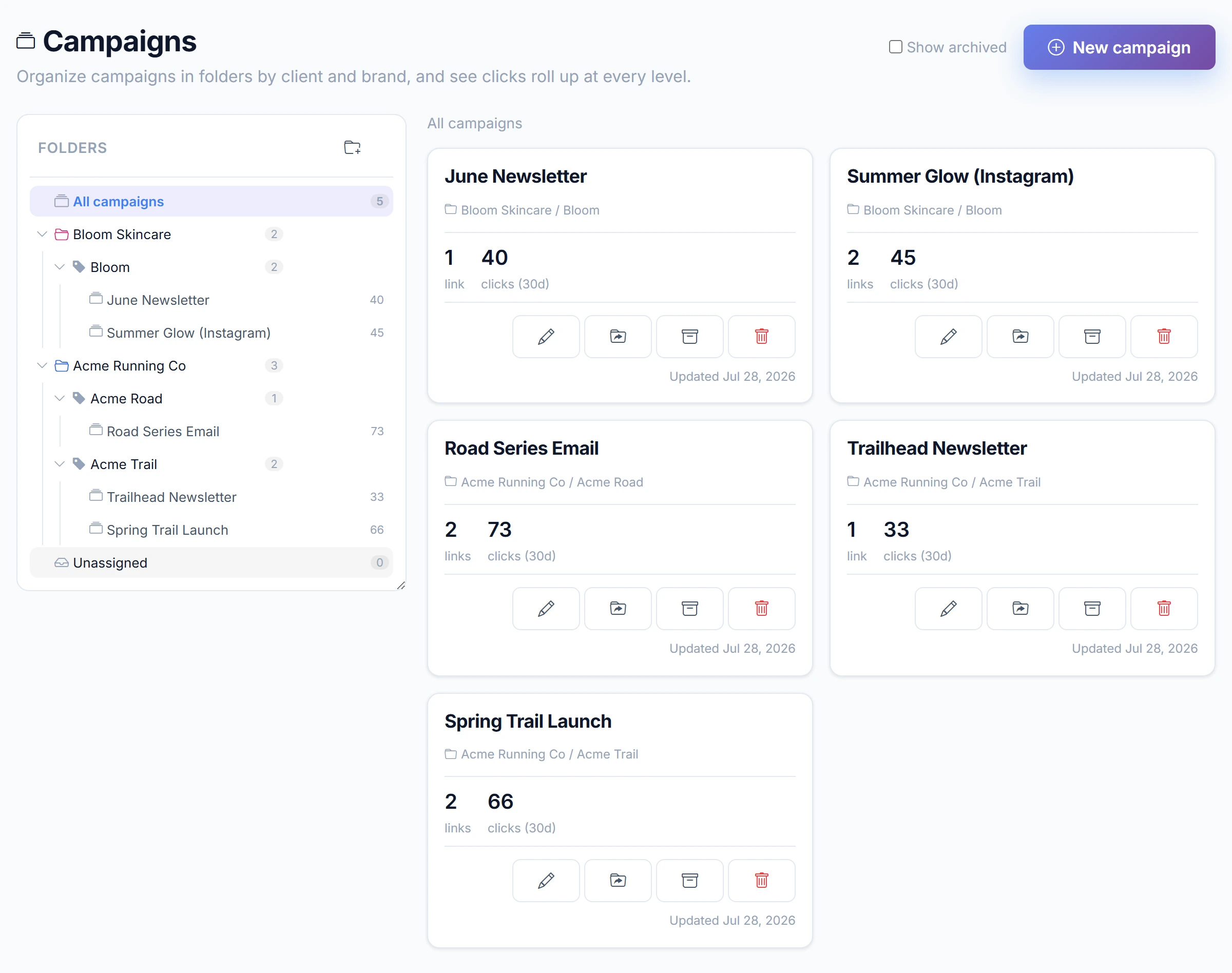
Per-Campaign
Report on one launch on its own, like spring-sale-instagram, with clicks by channel and day.
Per-Brand
Group every campaign under a brand and read that brand's total performance in one view.
Per-Client
Roll everything up to the client that owns the work, so the monthly client report writes itself.
Basic includes 1 client and 1 brand. Pro unlocks unlimited clients and brands.
Prove Link Performance to Clients
Per-link data that makes client meetings easy
Click Tracking
"Your branded link got 2,847 clicks this month, up 34% from last month."
Geographic Data
"68% of clicks came from your target markets: NYC, LA, and Chicago."
Device Insights
"Mobile traffic is up, 75% of clicks came from iOS and Android devices."
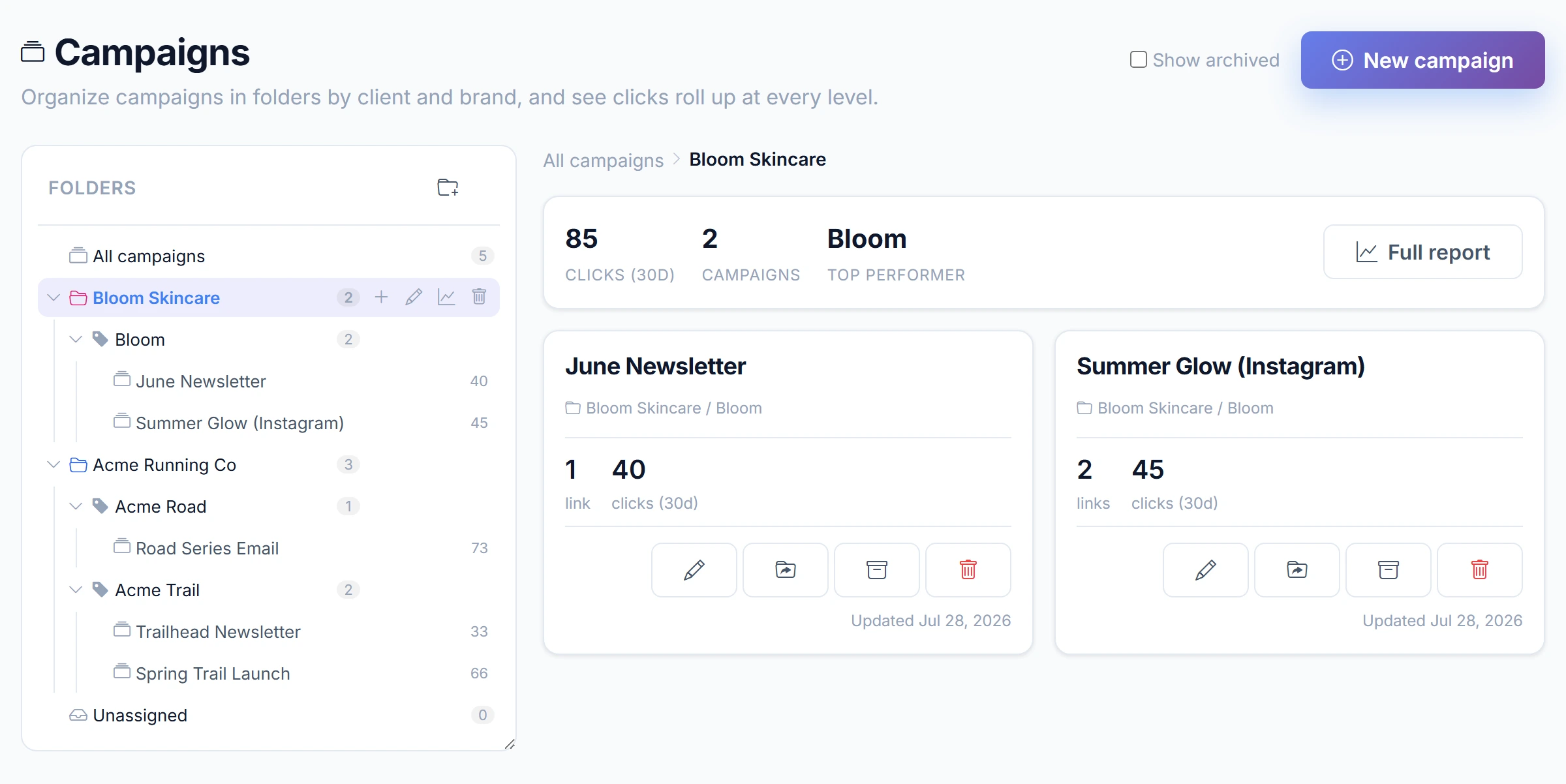
Built for agencies, available now
Run every client and brand with your whole team, on one account.
Available now
- Team workspaces where the work belongs to the team, not to whoever made the link
- Client, Brand and Campaign folders with roll-up reporting
- Scoped sharing, give a teammate or a client contact access to one client, brand or campaign and nothing else
- AI insights across your whole portfolio
- API access, documented and live, so you can integrate with your own tools
On the roadmap
- Client reports, a read-only view your client opens without signing up for anything
- White-label branding, your logo and your own domain on the report
We are shaping the Agency roadmap with our first agencies. Need a specific feature?
Request a FeatureSimple Agency Pricing
Start free, upgrade when you need more
Free
Free forever, no credit card
- 10 AI suggestions/month
- 10 custom URLs
- Unlimited clicks
- Basic analytics
- 14-day analytics retention
- Permanent links (never expire)
- Basic QR codes (B&W)
- 3-second interstitial
Pro
Lock in $12/mo forever
- Unlimited AI suggestions
- Unlimited URLs
- Unlimited clicks
- Any slug length (no restrictions)
- Unlimited data retention
- Advanced analytics
- Permanent links
- Custom QR codes (colors + logos)
- Instant redirects
- No branding
- Lock in $12 forever
Agency
Run every client and brand in one place, with your whole team.
Early adopter price, rises to $129
Start with Agency5 seats included: you plus 4 teammates. Anyone invited to a single client folder counts as a seat, and removing someone frees it. Need more seats? Talk to us.
Everything in Pro, plus:
- Links belong to the workspace, not to whoever created them
- Teammates see and work on each other's links, so anyone can cover a campaign
- Every link shows who created it, and removing someone leaves their links intact
- All 5 seats see the same analytics depth, from your plan
- Read, Write and Admin roles (Admin is required to delete a link)
- 5 seats included: you plus 4 teammates, and anyone invited to one folder
- Multi-client Client, Brand and Campaign folders
- Scoped sharing: give access to one client, brand or campaign and nothing else
- Roll-up reporting across every client and brand
- AI insights across your whole portfolio
- Activity audit log
- Client reports: your client opens their report from a link you send them, and they never sign up and never take a seat
- Coming soon: white-label branding, your logo and your own domain on the report
Agency FAQ
Common questions from marketing agencies
Can I manage multiple clients in one account?
Yes. Organize your work by client and brand: file each campaign under the brand it belongs to, then under the client that owns it, all in one folder view on your Campaigns page. Clicks roll up from campaign to brand to client, so you can report on a single campaign, a whole brand, or everything you run for one client. Basic includes 1 client and 1 brand; Pro unlocks unlimited clients and brands.
How does client and brand reporting work?
Every campaign lives under a brand, and every brand under a client. Clicks roll up through that hierarchy, so the same channel breakdown, daily trend, and click map are available at the campaign, brand, and client level. Report on one launch like spring-sale-instagram, a whole brand, or everything you run for one client, without exporting and stitching spreadsheets together.
How do I prove campaign ROI to clients?
URLcut.ai provides detailed analytics including clicks, unique visitors, geographic data, device types, and referral sources. Export this data for client reports.
Who owns the links my team creates?
Your workspace does. On the Agency plan a link belongs to the workspace it was filed into, not to the person who created it, so work done for a client stays with that client. Every link still shows who created it, and that authorship never changes. This is the same model GitHub uses: the organization owns the repository, the person keeps the credit.
What happens to a teammate's links when they leave?
Nothing. Removing someone from the workspace revokes their access immediately and touches none of their work. Every link they created keeps working, stays in its client and campaign folders, and keeps counting towards your reports. Their name stays on the links they made. Their seat is freed for the next person.
Can my teammates see links they did not create?
Yes, by default. Everyone in the workspace can see and work on the workspace's links, so anyone can cover a campaign while a colleague is away. If you need stricter separation, a workspace can be set so members see nothing by default and get access only where you grant it.
Do my teammates get the same analytics I pay for?
Yes. Analytics depth on workspace data comes from the workspace owner's plan, not from each teammate's own plan, so all 5 seats see the same retention window, the same breakdowns, and the same AI insights. Personal allowances stay personal: how many links each person can create in a month is still governed by their own account.
Can I share link analytics with a client without giving them access to my account?
Yes. Your client opens their report from a link you send them. They never sign up, and they never take a seat. The report is read-only, it shows only that client's own brands, campaigns and links, it never shows a destination URL, and you can revoke the link at any time. One live link per client: send the same link to as many of the client's people as you like.
Can I give a client access to only their own folder?
Two ways, and they are different. To give a client their own report, share it: your client opens their report from a link you send them. They never sign up, and they never take a seat. To give someone hands-on access to a folder, invite them to a single client, brand or campaign and they see that and nothing else, without becoming a full member of the workspace; an invite does need an account and does occupy one of your 5 seats. White-label branding on a shared report, your logo and your own domain, is on the roadmap.
Can multiple team members access the account?
Yes. The Agency plan includes team workspaces with Read, Write and Admin roles, so you invite teammates and give each the right level of access, no shared logins. You can also scope access to a single client, brand or campaign. Client reports are live: your client opens their report from a link you send them, they never sign up, and they never take a seat. White-label branding on that report, your logo and your own domain, is on the roadmap.
What can each team role do?
Three roles. Read can view links and reports for whatever it is given access to. Write can also create and edit links and campaigns, and can stop a link immediately if it is pointing somewhere wrong. Admin can additionally delete links, manage access, and invite or remove people. Deleting is Admin because it releases the short code, which would break every QR code and email already using it. You can assign a role for a whole workspace or scope it to a single client, brand or campaign.
How many team members does the Agency plan include?
The Agency plan includes 5 seats: you plus 4 teammates. Every person with access counts: the owner, each active member, each pending invite, and anyone invited to just a single client folder. Removing someone frees their seat straight away. Talk to us if you need more seats.
What does an agency get that a single marketer does not?
Client and brand folders with roll-up reporting, five seats with roles, unlimited branded domains and subdomains, and shareable client report pages. Links follow the folder they belong to, so handing a client over does not mean rebuilding their links.
Can I use custom domains for clients?
Yes. On Pro you can serve each client on your own custom domain (go.clientbrand.com/promo), and branded urlcut.ai subdomains (clientbrand.urlcut.ai) start on Basic. Subdomains go live the moment you claim them with no DNS setup, and HTTPS is automatic on every link.
Do you offer agency or bulk pricing?
Yes. The Agency plan is $79/month (early adopter, normally $129) and includes team workspaces, Read/Write/Admin roles, multi-client folders, scoped sharing, and 5 seats, you plus 4 teammates. Talk to us if you need more seats or have specific requirements.
Related Resources
Explore more URLcut.ai features
Campaigns for Agencies
Running several client campaigns at once? Organize each in its own campaign hub.
Bitly Alternative
See how URLcut.ai compares to Bitly for agency work.
URL Shortener API
Automate link creation and integrate with your tools.
Password-Protected Links
Share client content securely with password protection.
All Features
Explore everything URLcut.ai can do for your agency.
URL Shortener Comparison
Complete 2026 comparison guide.
Pricing
Unlimited links and client reporting from /mo.
For Content Creators
Manage creator campaigns with AI-powered short links.
Email Marketing Links
Short links for client email campaigns with full tracking.
Ready to Level Up Your Agency's Links?
Professional links, powerful analytics, happy clients.
Try URLcut.ai free, no credit card required.